Software architecture is a multi-dimensional thing. A single diagram can’t capture every aspect — it ends up cluttered, contradictory, or both. Architectural views are different perspectives onto the same system, each tuned to a specific stakeholder concern.
This lesson is a tour of the views that pay off in practice: Philippe Kruchten’s 4+1 model, quality views that overlay structural concerns, Simon Brown’s C4 model, and where enterprise frameworks fit in.
The 4+1 View Model
Kruchten’s 4+1 model is the classic answer to “how do I document this without my diagram becoming a spaghetti plate?” Four structural views, plus a unifying Scenarios view that ties them together.
🧩
Logical view
What the system does. Functional decomposition, domain objects, key abstractions. Drawn with class diagrams, state machines.
⚙️
Process view
The system at runtime. Processes, threads, queues, communication patterns. Concurrency, distribution, performance.
📦
Development view
How the code is organized. Modules, packages, build artifacts, team ownership boundaries.
🏢
Physical view
How software maps to hardware. Deployment topology, networking, capacity. The view DR planning lives in.
Logical view — what the system does
Functional requirements and the services delivered to end users. Domain objects, key behavioural patterns, the abstractions the rest of the team will reference in standups. We’ll dig much deeper when we get to Domain-Driven Design.
Process view — the system in motion
The runtime architecture: processes, threads, services, queues, and how they talk. Where the logical view is a static picture of what the system is, the process view shows what’s happening at runtime.
Development view — the codebase
The static organization of the code. Modules, libraries, packages, build artifacts, ownership boundaries between teams.
Physical view — software meets hardware
How software maps onto infrastructure: where things actually run, how they’re networked, how resources are allocated.
Scenarios — the +1
Use-case walkthroughs that exercise all four structural views together. The consistency check — that logical, process, development, and physical describe the same system, not four different ones.
Quality Views
The four structural views describe the what and the where. Quality views describe the how well — non-functional behavior cutting across structural views.
Security view
Defenses + attack surface
Trust boundaries, authn/authz flows, encryption points, access control. What a security team or auditor wants on the wall during an assessment.
Performance view
Latency + throughput + scalability
CDNs, cache tiers, autoscaling tiers, read replicas, indexes. Paired with metrics — response time, throughput, bottleneck identification.
Views can overlay productively. Combined views highlight strong, frequently-cited associations between two views — show the process view, then overlay security boundaries from the security view.
The C4 Model
Simon Brown’s C4 isn’t an “architectural view” in the 4+1 sense — it’s a visualization method. But it’s how modern teams typically document architecture, so it earns a section.
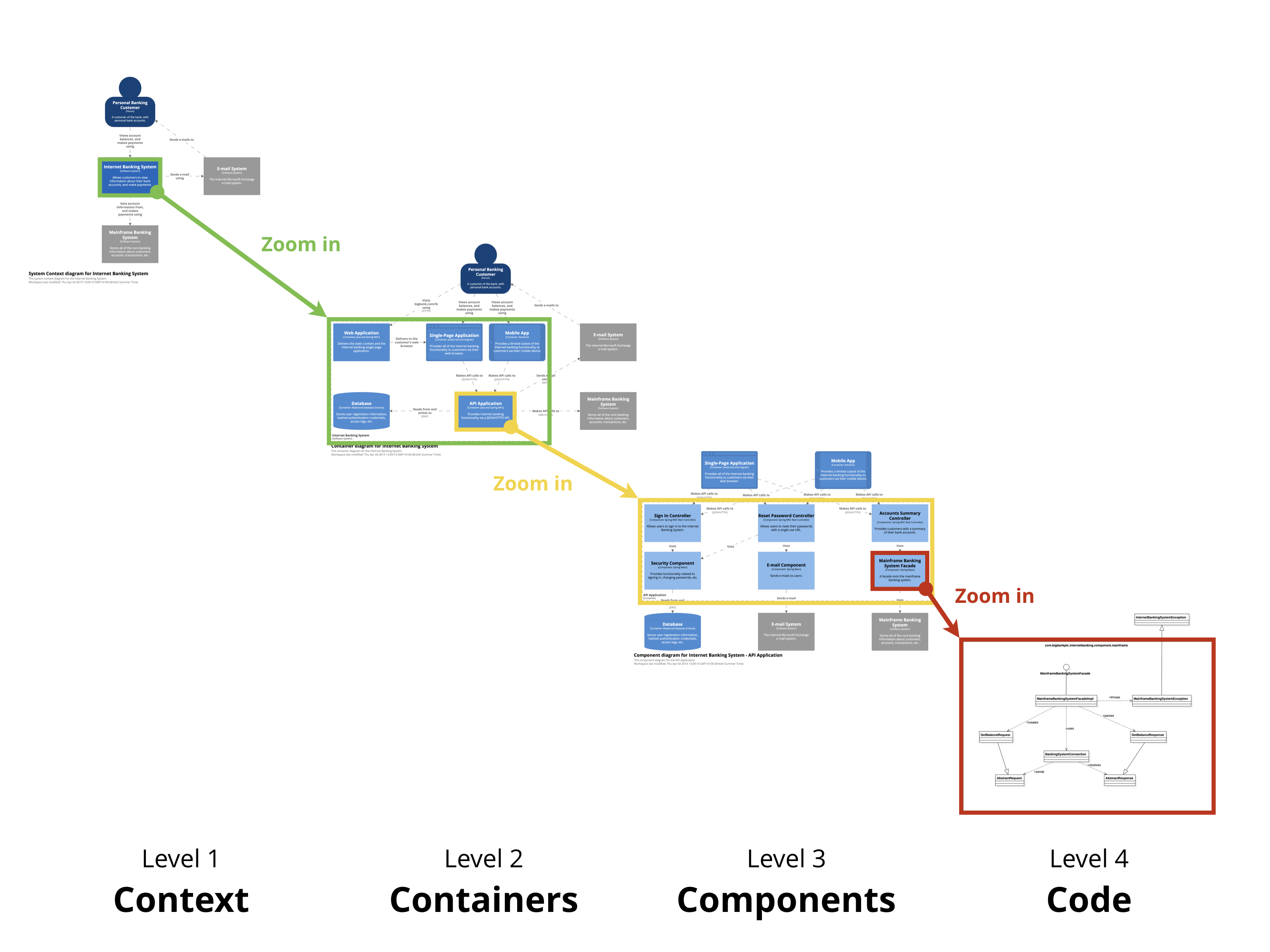
C4 gives you four levels of zoom — progressively more detailed.
01
Step 01
System Context
What is this system, and how does it fit into the world? One box, the people who use it, the systems it talks to. No tech details. Aimed at non-technical stakeholders.
02
Step 02
Containers
Zoom in. A "container" = a deployable unit (web app, API service, DB, message broker). Shows the architecture shape and technology choices.
03
Step 03
Components
Zoom into one container. Shows the major code building blocks behind well-defined interfaces. Should map to real groupings in the codebase.
04
Step 04
Code
Zoom into one component. Class diagrams, interfaces, implementation shape. Often auto-generated from IDE; decays fastest as code changes.
Enterprise Architecture Frameworks
For organizations needing a catalog of standardized views:
🏛️
ArchiMate
The Open Group. Most thorough — three layers (Business/Application/Technology) + cross-cutting aspects + 25+ viewpoints.
🗺️
TOGAF ADM
Architecture Development Method. Standard domains: Business, Data, Application, Technology.
📊
Gartner EA
More pragmatic, business-outcome-focused. Emphasizes IT-business strategy alignment.
These frameworks are heavyweight. They earn their keep in regulated enterprises with hundreds of systems. For a single SaaS product team, 4+1 plus C4 is usually more than enough.
Three Habits That Make Views Useful
01
Step 01
Start from stakeholder needs
Who's looking, and what decision are they making? The view that doesn't serve a decision is documentation theater.
02
Step 02
Pick views and notations to fit the question
A C4 container diagram for new joiners, a sequence diagram for an outage post-mortem, a security overlay for an audit.
03
Step 03
Keep documentation alive
A view that lies is worse than no view. If the diagram is wrong, fix it or delete it.
Recap
One diagram can’t show everything. Use multiple views, each for a specific concern.
4+1 model — Logical, Process, Development, Physical, plus Scenarios — covers structural concerns.